Brother MFC-L8930CDW Business Colour Laser All-in-One with Duplex Print, Scan, Copy, and Low-Cost Printing
- N° modèle:
- MFCL8930CDW MFCL8930CDWBrother
The Brother MFC-L8930CDW Business Colour Laser All-in-One prints up to 33 ppm(2), features advanced scanning capabilities, saves money by using super high yield replacement toner cartridges, and offers flexible connectivity including mobile device printing and scanning(1). Voir la description complète du produit
 Produit en stock et prêt à être expédié

Speed
up to 33 ppm

Security
Triple Layer Security

Connectivity
Flexible connectivity
Description du produit
Delivering reliable performance, the Brother MFC-L8930CDW Business Colour Laser All-in-One supports business work teams in high-demand environments. It offers fast printing and copying with lifelike colour and sharp black output for professional documents and collateral. Advanced scanning capabilities include a legal-sized document glass, fast, duplex scanning up to 104 ipm(4), scanning directly from the touchscreen to popular destinations like cloud services (6), email, SharePoint, SSH Server (SFTP), and the ability to create searchable, editable Microsoft Office documents(7). The 7” touchscreen also allows for easy navigation, scan previewing and the creation of 64 customized shortcuts for your most frequently used tasks. Paper-saving duplex printing and the included Brother Genuine standard yield toner maximize printing budgets, and when the time comes to replace your toner, opt for TN635XXL super high yield replacement cartridges for added cost-efficiency. Flexible paper handling includes a 250-sheet capacity paper tray, a 50-sheet capacity multipurpose tray for printing on custom media and envelopes, an 80-page auto-document feeder, and the ability to add on optional trays for expandable capacity up to 1,340 sheets(5). Triple Layer Security features help to keep the device secure, protect documents in transit, and safeguard against network intrusions. The printer includes dual-band (2.4GHz/5GHz) wireless and Gigabit Ethernet for wireless or wired networks, as well as convenient mobile device printing and scanning(1). With all these features packed into a durably designed, compact footprint, this model is poised to meet the business needs of today.
Pour en savoir plus sur le 'Brother MFC-L8930CDW Business Colour Laser All-in-One with Duplex Print, Scan, Copy, and Low-Cost Printing', téléchargez la brochure en cliquant ici.
Caractéristiques principales
- Professional results. Lifelike colour and sharp black output for professional-quality business documents, presentations, and marketing collateral.
- Fast printing speeds. Print at speeds of up to 33 ppm(2) and use automatic two-sided printing to reduce paper usage, minimize costs and help optimize productivity.
- Maximize printing budgets. Print confidently with included Brother Genuine 3,000-page black and 1,800-page colour toner and further reduce printing costs with super high yield replacement toner, for 7,500 pages black and 6,500 pages colour(3).
- Advanced, high-speed scanning. Offers fast, duplex scanning up to 104 ipm(4), legal-sized document glass, scanning to cloud services (6), email, SharePoint, SSH Server (SFTP) and the ability to create searchable, editable Microsoft Office documents(7).
- 7” colour touchscreen display. Enables easy menu navigation, scan preview, and the creation of up to 64 customized shortcuts for your most frequently used tasks.
- Expandable paper capacity. Offers a 250-sheet capacity paper tray, 50-sheet capacity multipurpose tray for printing on custom media and envelopes and an 80-page(5) ADF for large scan and copy jobs. Expandable up to 1,340 sheets with optional trays(5).
- Flexible connectivity. Features built-in dual-band (2.4GHz/5GHz) wireless networking and Gigabit Ethernet networking for seamless setup and sharing, plus easy printing from and scanning to mobile devices(1).
- Triple Layer Security. Advanced security features help keep devices secure, protect documents in transit to and from print devices, and safeguard networks. Includes an integrated NFC card reader for easy badge authentication.
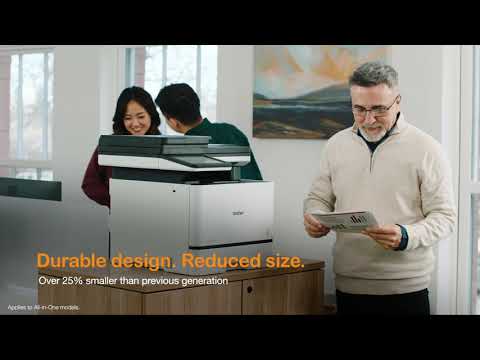
- Durable design, reduced size. Built for dependable performance and efficiency, this model is ideal for today’s business needs; additionally, it is over 25% smaller than its predecessor.
- At Your Side support. 1-year limited warranty and free online or live-chat support for the life of your printer.
Impression
| Impression de codes à barres | Oui |
| Couleur d'impression | Couleur |
| Vitesse d'impression maximale en couleurs | 33 ppm |
| Technologie d'impression | Laser |
| Les fonctions | Impression,Copie,Numérisation,Télécopie |
| Résolution d'impression (ppp max.) | Jusqu’à 2 400 x 600 ppp |
| Impression recto verso | Oui |
| Capacité d'impression recto verso | Oui |
| Vitesse d'impression maximale en noir et blanc | 33 ppm |
| Résolution d'impression max. (ppp) | Jusqu’à 2 400 x 600 ppp |
| Format alimentation papier - Bac à papier | Lettre,Légal,Exécutif,A4,Folio,A5,A6 |
Copie
| Résolution de copie (max.) | 1 200 x 600 ppp |
Numérisation
| Résolution de numérisation optique (ppp) | 600 x 600 ppp (chargeur auto de documents) |
| Résolution de numérisation interpolée (ppp) | Jusqu'à 19 200 x 19 200 ppp |
| Fonctions de « numérisation vers » | Infonuage (Web Connect),Easy Scan to Email,Serveur de messagerie,FTP,Appareils mobiles,Dossier réseau,Serveur SSH (SFTP),SharePoint,Lecteur de mémoire USB |
| Numérisation recto verso | Oui |
Autre
| Type(s) de support - Bac à papier | Ordinaire,Recyclé,Papier en couleur,Papier à en-tête |
| Garantie | Garantie limitée d'un an |
Caractéristiques matérielles
| Connectivité | Ethernet,USB |
Caractéristiques logicielles
| Émulation(s) | BR-Script3,PCL6 |
Fournitures et accessoires
Brother authentique WT229CL Réservoir de récupération de toner
- Article no:
- WT229CL
Brother authentique WT229CL Réservoir de récupération de toner
- Article no:
- WT229CL
Brother authentique BU635CL Courroie
- Article no:
- BU635CL
Brother authentique BU635CL Courroie
- Article no:
- BU635CL
Brother authentique FD-5000 Unité de fusion
- Article no:
- FD5000
Brother authentique FD-5000 Unité de fusion
- Article no:
- FD5000
Toner
Brother Genuine TN635BKStandard Yield Black Toner Cartridge
- Article no:
- TN635BK
Brother Genuine TN635BKStandard Yield Black Toner Cartridge
- Article no:
- TN635BK
Brother authentique TN635XLBK Cartouche de toner noir à haut rendement
- Article no:
- TN635XLBK
Brother authentique TN635XLBK Cartouche de toner noir à haut rendement
- Article no:
- TN635XLBK
Brother authentique TN635XLC Cartouche de toner cyan à haut rendement
- Article no:
- TN635XLC
Brother authentique TN635XLC Cartouche de toner cyan à haut rendement
- Article no:
- TN635XLC
Brother authentique TN635XXLBK Cartouche de toner noir à très haut rendement
- Article no:
- TN635XXLBK
Brother authentique TN635XXLBK Cartouche de toner noir à très haut rendement
- Article no:
- TN635XXLBK
Brother authentique TN635XXLC Cartouche de toner cyan à très haut rendement
- Article no:
- TN635XXLC
Brother authentique TN635XXLC Cartouche de toner cyan à très haut rendement
- Article no:
- TN635XXLC
Brother authentique TN635XXLM Cartouche de toner magenta à très haut rendement
- Article no:
- TN635XXLM
Brother authentique TN635XXLM Cartouche de toner magenta à très haut rendement
- Article no:
- TN635XXLM
Brother authentique TN635XXLY Cartouche de toner jaune à très haut rendement
- Article no:
- TN635XXLY
Brother authentique TN635XXLY Cartouche de toner jaune à très haut rendement
- Article no:
- TN635XXLY
Brother authentique TN6353PK Ensemble de 3 cartouches de toner, cyan, magenta et jaune
- Article no:
- TN6353PK
Tambours
Brother authentique DR635CL Tambour
- Article no:
- DR635CL
Brother authentique DR635CL Tambour
- Article no:
- DR635CL
Brother MFC-L8930CDW Business Colour Laser All-in-One with Duplex Print, Scan, Copy, and Low-Cost Printing
N° modèle: MFCL8930CDW
Ce n’est pas votre produit?Téléchargements et documents
Téléchargements et pilotes
Obtenir les téléchargements et les pilotes pour ce produit du Centre de Solutions de Brother
Trouver les téléchargements et les pilotes Télécharger l’application iPrint&Scan
Manuels et documents
Obtenir les téléchargements et les pilotes pour ce produit du Centre de Solutions de Brother
Télécharger les manuels et les documentsBrochure du produit
Découvrez tout ce que vous voulez savoir au sujet du programme dans ce PDF.
Télécharger la brochure du produitAvez-vous des questions?
 Posez une question
 Clavardage en direct
Brother MFC-L8930CDW Business Colour Laser All-in-One with Duplex Print, Scan, Copy, and Low-Cost Printing
N° modèle: MFCL8930CDW
Ce n’est pas votre produit?
Téléchargements et documents
Téléchargements et pilotes
Obtenir les téléchargements et les pilotes pour ce produit du Centre de Solutions de Brother
Trouver les téléchargements et les pilotesTélécharger l’application iPrint&ScanManuels et documents
Obtenir les téléchargements et les pilotes pour ce produit du Centre de Solutions de Brother
Télécharger les manuels et les documentsBrochure du produit
Découvrez tout ce que vous voulez savoir au sujet du programme dans ce PDF.
Télécharger la brochure du produitAvez-vous des questions?
Posez une question
Clavardage en direct
Garantie
Garantie limitée d'un an
Politique de retour
Vous pouvez retourner tout appareil Brother acheté sur brother.ca dans les 30 jours suivant l'achat, pourvu que la boîte ne soit pas ouverte et que vous ayez un numéro d'autorisation de retour de matériel (RMA) valide.* Contactez-nous afin que nous puissions évaluer la meilleure solution pour vous, soit en vous fournissant un appareil différent, en vous aidant avec la configuration ou en émettant un numéro d’autorisation de retour. Tous les frais d'expédition sont à votre charge. Cependant, si nous déterminons que l’appareil est défectueux ou si nous sommes autrement responsables, il nous fera plaisir d’effectuer la cueillette de l’appareil à nos frais. Après avoir effectué l’inspection de l’appareil retourné, nous vous rembourserons sur votre carte de crédit.
Si vous n’avez pas acheté votre appareil sur brother.ca, laissez-nous le simplement savoir et nous ferons de notre mieux pour trouver une solution.
Pour nous contacter par l'intermédiaire du service Posez une question, cliquez ici : https://soutien.brother.ca/app/ask










 Votre article a été ajouté au panier